A newsletter for artists is a short email, usually monthly, that tells the people who follow your work what you've made, what's in progress, and what's coming up. Start with a sign-up form on your website, send one simple issue a month, and choose a platform that fits: Ghost if you want your website and newsletter in one place, or a free email tool like Kit, MailerLite, or beehiiv if you only need the emails.
If you make visual work, a newsletter might be the most useful thing you can add to your website. Social media decides who sees your posts. A newsletter goes to everyone who asked for it, and they read it when they're ready. This guide covers how to start one, which platform to use, what to send, and how to set it up on Ghost. Our own studio's sign-up works the same way: one form on the site, and the emails come from Ghost.
Your newsletter's first readers will often meet you on your about page, so it's worth getting that right too: see our artist bio examples.
Why a newsletter, and why now
Most artists and photographers have felt it: you post new work, and a fraction of your followers ever see it. Algorithms change, accounts get buried, and platforms come and go. A list of email addresses is different. It belongs to you, it moves with you if you change platforms, and the people on it chose to hear from you.
It's also where sales and commissions tend to come from. People who open your emails month after month are the ones who buy prints, come to openings, and recommend you to an editor.
What to send, and how to write a good artist newsletter
You don't need to be a writer. A good creative newsletter is short, personal, and about the work. Some ideas:
- New work, with a few images and the story behind it.
- Work in progress: sketches, contact sheets, test prints, or a messy studio.
- What's coming up: shows, talks, workshops, markets, or a print release.
- What you're looking at: a book, an exhibition, another artist you admire.
- A lesson from your practice: a technique, a mistake, a decision you made.
One simple format that works: one new piece of work, one thing in progress, one thing coming up. Five minutes to read, and something to look at.
Twelve newsletter ideas for artists
When you're stuck, pick one:
- The story behind one new piece.
- A page from your sketchbook, with a line about where it's going.
- A studio tour in five photos.
- Your process, start to finish, for one work.
- A mistake you made, and what you kept from it.
- Three things you saw this month that you can't stop thinking about.
- A question for your readers, and their answers next month.
- A short interview with a collaborator, printer, or framer.
- Early access to a print release or open studio.
- Where your work will be shown, and how to visit.
- A look back at a project from five years ago.
- The year in twelve pictures.
How often
Once a month suits most creatives. It's often enough that people remember you, and rare enough that every issue has something new in it. What matters most is keeping a rhythm. A short email every month beats a long one every now and then.
Getting your first subscribers
- Put a sign-up form on your site: your homepage, your about page, and the end of every project.
- Link it everywhere: your Instagram bio, your email signature, and your other profiles.
- Bring it to real life. A small card or QR code at shows, markets, and talks works surprisingly well.
- Ask people personally. Friends, past clients, and collectors are usually happy to sign up if you ask.
Only add people who agreed to hear from you. A small list of people who want your emails is worth far more than a big list of people who don't.
Which newsletter platform should an artist use?
Any of these will send a good newsletter. The real differences are whether there's a free plan, whether the platform takes a cut if you ever charge for issues, and whether you get a whole website or only the emails. Prices as of November 2026:
| Platform | Free plan | Fee on paid subscriptions | Website |
|---|---|---|---|
| Ghost(Pro) | No, from $15 a month billed yearly | 0% from Ghost | A full website, with your portfolio |
| Substack | Free to start | 10% | A Substack publication page |
| beehiiv | Up to 2,500 subscribers | 0% from beehiiv | A newsletter website |
| Kit | Up to 10,000 subscribers | Check current terms | Landing pages |
| MailerLite | Up to 250 subscribers | Check current terms | A simple site builder |
| Buttondown | Up to 100 subscribers | 0% from Buttondown | An archive page |
Card payments add Stripe's fee on top everywhere, which is 2.9% plus 30 cents per US card charge. Sources: Ghost's pricing and Substack's paid publishing page.
Our view, as a studio that builds on Ghost: if you want one place for your portfolio, your journal, and your newsletter, Ghost saves you from stitching two tools together. If you already have a website you love, a free plan from Kit, beehiiv, or MailerLite is a fine place to start, and you can move your list later.
Setting it up on Ghost
Ghost is built for this. Your website and your newsletter are one thing, so there's no separate email service to connect.
- Turn on sign-ups. In Ghost's settings, under membership, let visitors sign up. Your theme adds subscribe forms to your site.
- Design your newsletter. Under Settings, then Newsletters, set your header, fonts, and colors so emails feel like your site.
- Publish and send in one step. When you publish a project or journal entry, choose to also send it by email. Your new work reaches your website and your subscribers at the same moment.
- Send from your own address. On Ghost(Pro) Publisher and higher, emails can come from your own domain, which looks more professional and helps them reach inboxes.
Email sending is included in Ghost(Pro), with unlimited sends on every plan. If you'd like to charge for some of your work later, like a members-only journal or early access to print releases, Publisher adds paid subscriptions with no Ghost fees.
Using Index for your newsletter
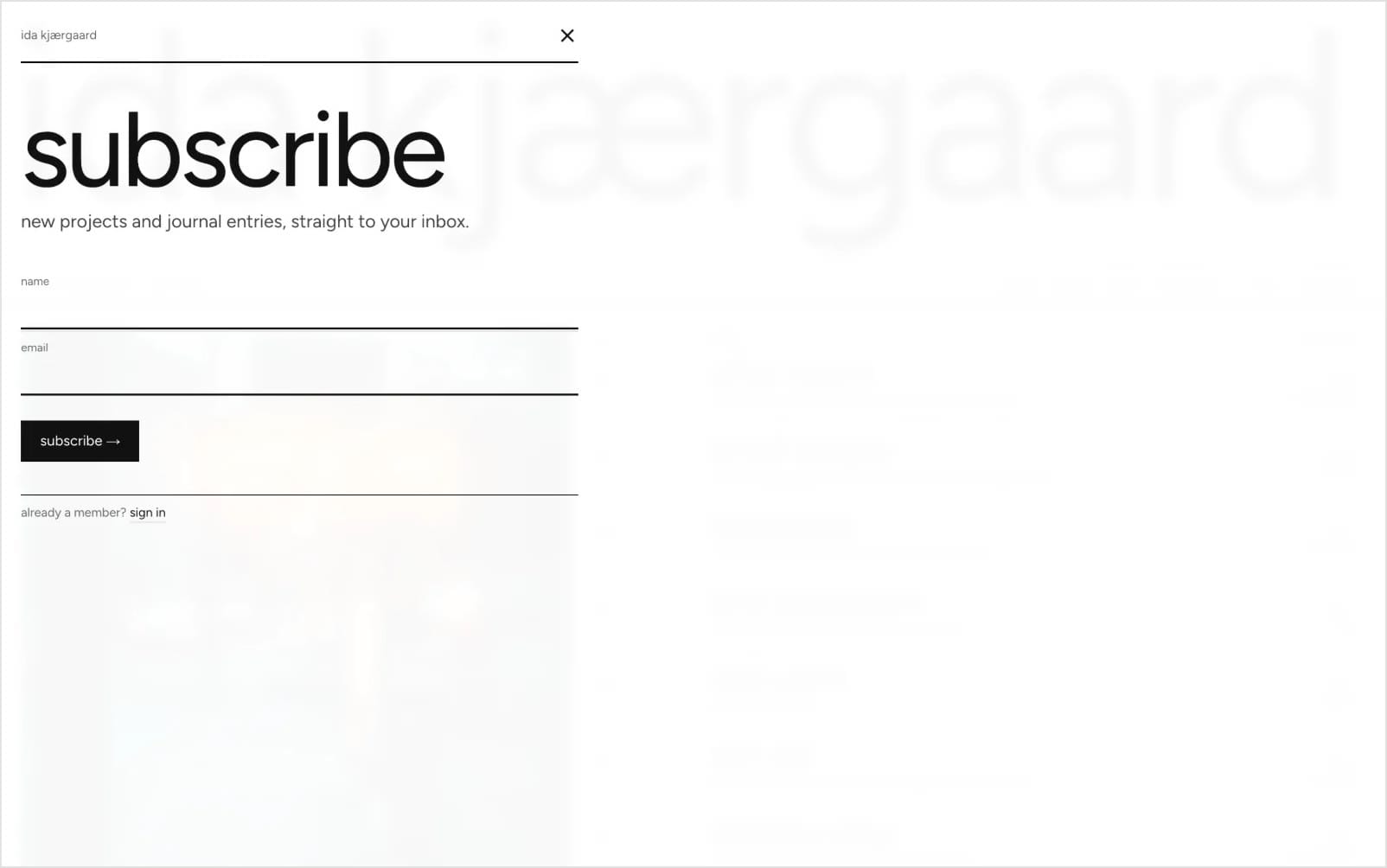
Our theme, Index, was made with this in mind. Its subscribe forms and sign-in panels match the rest of your site, so signing up feels like part of your portfolio. Projects and journal entries are ordinary Ghost posts, so any of them can go out as a newsletter the moment you publish. A typical rhythm is a new project emailed when it's finished, and a short journal entry each month in between. The docs explain how search and members work in the theme.
You can try the live demo to see the subscribe forms in place.
Your first issue
Keep it short. Say hello, explain in a sentence or two what you'll send and how often, share one recent piece of work and the story behind it, and say what's coming next. Then send it. The second issue is always easier.
Here's a short first issue you could adapt. The name and details are invented.
Hello, and thank you for signing up. I'm Maya, a painter in Leeds, and this is the first of a monthly letter about what's on my easel.
This month I finished Park at Dusk, the largest painting I've made so far. It started as a ten-minute sketch on a bench in October and took eight weeks in the studio. There's a photo of the sketch and the finished painting below.
Next: I'm showing three new paintings at a group exhibition in Leeds in March. Subscribers will hear the dates first. Until next month, Maya
That's under 120 words. It says who you are, what to expect, one piece of work, and one thing coming up.
Moving a newsletter you already have? See Ghost vs Substack for how to switch without losing subscribers.
And if you'd like your portfolio and newsletter to feel like one thing, take the tour of Index. Its sign-up forms are designed to match the rest of the site, so subscribing feels like part of your work, not a pop-up in front of it.
Questions people ask
Do artists and photographers need a newsletter?
It helps a lot. Social media decides who sees your posts, but a newsletter reaches everyone who signed up, which makes it the most reliable way to tell people about new work, shows, and print sales.
What should I put in a newsletter as an artist?
New work and the story behind it, works in progress, upcoming shows, events, print releases, things you are reading or looking at, and the occasional lesson from your practice.
How often should a creative newsletter go out?
Once a month is a good rhythm for most artists and photographers. It is often enough to be remembered, and rare enough that each one has something new in it.
What is the best newsletter platform for artists?
Ghost, if you also want a portfolio website: your newsletter and your site live in one place, new projects can be emailed in the same step you publish them, and Ghost takes no fee from paid subscriptions. If you only need the emails, Kit, beehiiv, and MailerLite all have free plans.
How do I get my first newsletter subscribers?
Put a sign-up form on your website, link it from your social profiles and email signature, and bring a QR code to shows and markets. Ask friends and past clients personally.
Is Substack or Ghost better for artists?
Both work well. Substack is free to start and takes 10% of paid subscriptions. Ghost costs a monthly fee, takes no cut, and gives you a full portfolio website alongside the newsletter. See our Ghost vs Substack comparison for the details.
Can I start an artist newsletter for free?
Yes. Kit is free up to 10,000 subscribers, beehiiv up to 2,500, MailerLite up to 250, and Substack is free to start. Put the sign-up form on your website and link to it from your profiles.
Are newsletters still relevant for artists in 2026?
Yes. Social feeds decide who sees your posts, while a newsletter reaches everyone who signed up. It's still the most reliable way to tell people about new work, shows, and print releases.
Written by Pacha Themes. A small design studio making spacious, minimal themes for Ghost. Our first, Index, is a portfolio theme with 24 layouts, built and tested on Ghost 6. We write about Ghost, web design, and tips for creators here.